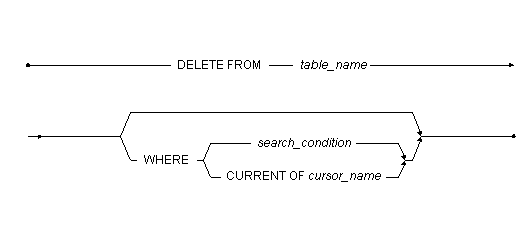
Deletes rows from a table.
| table_name | Name of the table you want to delete rows from. |
| search_condition | Conditions a row must meet to be deleted. |
| cursor_name | Name of the cursor to use for a positioned delete. Cursors are only available within ODBC programs. |
The DELETE command deletes all rows matching the search condition from a table. You can only delete rows from a single table, and you cannot delete rows from the system tables. To execute the DELETE command, you must be the table owner, have delete privilege on the table, or have DBA or SYSADM security privileges.
DBMaker will only delete rows that satisfy the search condition. See the WHERE clause in the SELECT command for more information on the search condition.
The following example deletes employee number 1234 from the Employee table.
|
The following example deletes all employees whose name begins with "John" from the Employee table.
|