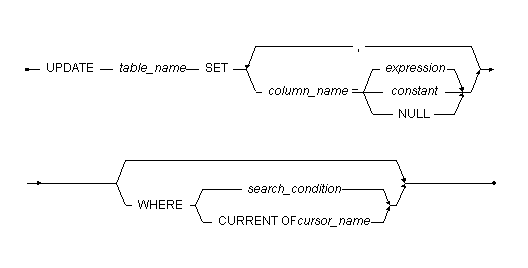
Changes column values in specified of a table.
| table_name | Name of the table containing the rows you want to update. |
| column_name | Name of the column you want to update values in. |
| expression | Expression that returns a value to update the column with. |
| constant | Constant value to update the column with. |
| search_condition | Conditions a row must meet to be updated. |
| cursor_name | Name of the cursor to use for a positioned update. Cursors are only available within ODBC programs. |
The UPDATE command updates existing rows in a table. You cannot update rows in the system catalog tables. To execute the UPDATE command on a table you must be the table owner, have DBA or SYSADM security privileges, or have UPDATE privilege for the entire table or for the specific column you want to insert data into.
When you update a column, the new column values must satisfy the column constraints and referential integrity. If the column has a default value defined, you can use the DEFAULT keyword to set the value of the column to the default value.
The following example shows how to update the Employees table and change the salary of all employees named "Jones".
|
The following example shows how to give a salary raise of 10% to all employees named "Trent".
|